HVAC quoting and estimating software

Send a good, better and best quote before you leave the driveway

You finish the diagnosis. The customer asks what it will cost. DuctWright turns that answer into a quote they can pick from on their phone.

14 days free. No card. No sales call.

How a quote works

  1. Open the unit you're working on. Start a new quote from it.
  2. Enter the house details: square footage, stories and insulation.
  3. Add up to five line items under Good, Better and Best.
  4. Send one link by email, or by text if you've connected a Twilio number.
  5. Your customer opens the link on their phone and picks an option. No account. No app.
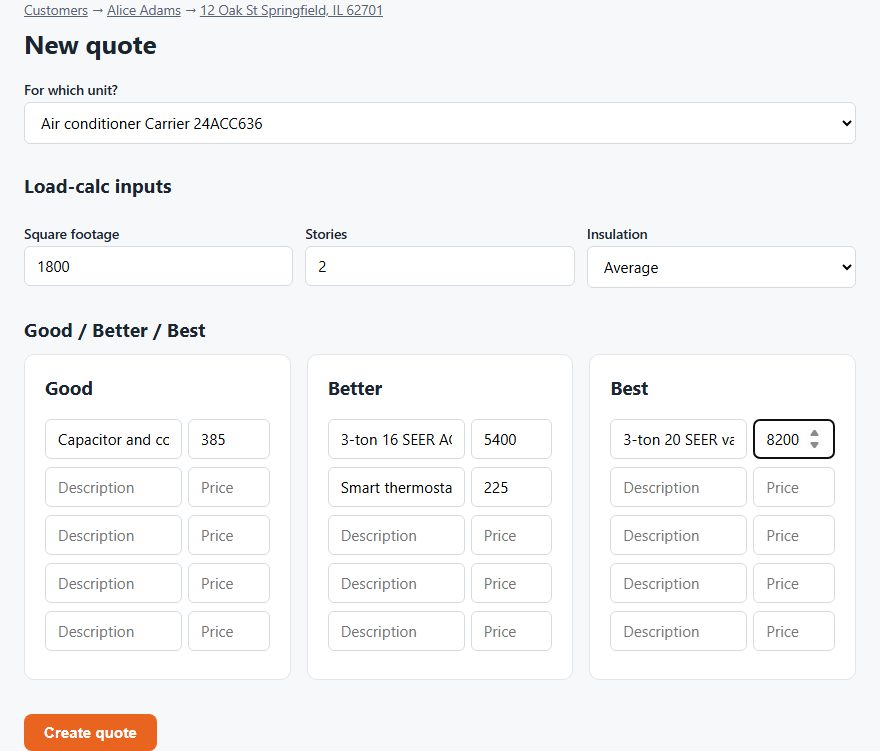
The DuctWright quote builder with good, better and best columns filled in
The quote builder. Demo data.

What your customer sees

One simple page with three options and one button under each. They can also say none of them work. You see their choice right away.
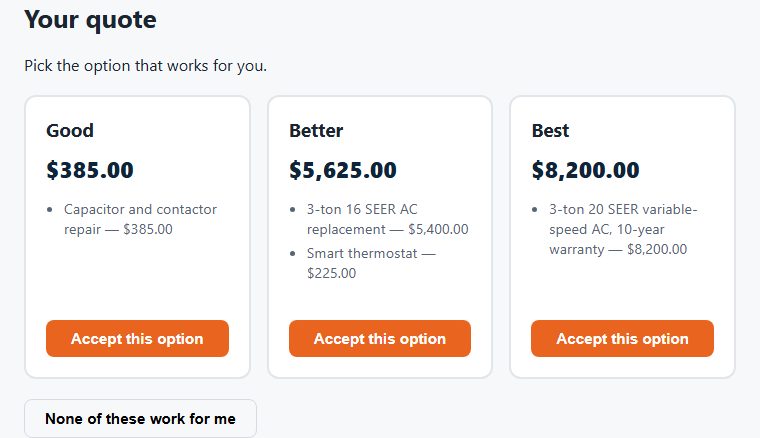
The customer's quote page showing three priced options
The customer's view of a quote. Demo data.

After they say yes

Schedule the job from the same quote. Pick a date and a tech. When the job is done, one click turns the quote into an invoice. Nothing gets retyped.

Quote lines can also come from your parts list. Accepting the quote takes those parts out of your stock count.

What it doesn't do

  • It records the load-calc inputs with the quote. It doesn't run a Manual J calculation for you.
  • The customer accepts by tapping a button. There's no drawn signature.
  • It doesn't offer customer financing.

Questions

Does my customer need an account to accept a quote?

No. They open the link and tap the option they want. There's nothing to sign up for or install.

How many options can one quote have?

Three: Good, Better and Best. Each can hold up to five line items.

Can I send quotes by text?

Yes, if you connect your own Twilio number in Settings. Email works without it.

Does DuctWright calculate the right system size?

No. It stores the square footage, stories and insulation you enter with the quote. You still size the system yourself.

How do you do an HVAC estimate?

Inspect the system and the home. For a replacement, size the new system with a load calculation. List the equipment, parts, labor and permits. Add your markup and tax. Then give the customer clear options, such as good, better and best, with a price for each. DuctWright doesn't run the load calculation for you, but it stores the inputs and sends the options.

What is the best HVAC quoting software?

For service and replacement quotes, look for good, better and best options and easy sending. Some estimating tools are built for large commercial takeoffs, which is a different job. We make DuctWright, so we're biased. It is built for service shops with 10 techs or fewer.

Try it on your own customers

Add a customer and their equipment. See the unit's whole history in one place.

Start your free trial

14 days free. No card.