HVAC invoicing software

Invoice from the quote. Skip the retyping.

The job is done and the customer is waiting. Your invoice already exists, because it came from the quote they accepted.

14 days free. No card. No sales call.

How invoicing works

  1. Finish the job. Mark it complete.
  2. Click Create invoice from accepted quote. Every line carries over.
  3. Send it. The customer gets a link to view it on their phone.
  4. Collect payment your usual way. Then record it: cash, check, card or other.
  5. If you use QuickBooks Online, send the invoice there with one click.
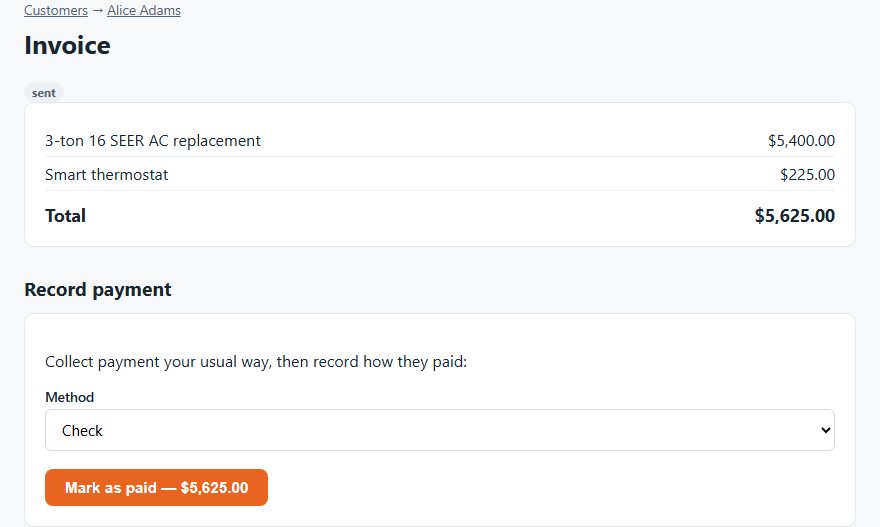
A DuctWright invoice with line items, a total and a record-payment form
An invoice ready for payment. Demo data.

QuickBooks Online sync

Connect your QuickBooks Online company once. After that, each invoice can go across with one click. DuctWright finds the matching customer in QuickBooks, or creates one.

The sync runs one way, from DuctWright to QuickBooks. Changes you make in QuickBooks don't come back.

How you get paid

DuctWright doesn't process your customers' payments. You keep using the card reader, bank or checkbook you already have. That means no new fees and no new payout schedule. It also means customers can't pay from the invoice link. They see the invoice and the total, and you collect as usual.

What it doesn't do

  • It doesn't take card payments online.
  • QuickBooks sync works with QuickBooks Online only, not QuickBooks Desktop.
  • It doesn't pull payments back from QuickBooks.

Questions

Can my customers pay by card from the invoice?

No. DuctWright doesn't process payments. The invoice link is view-only. You collect payment the way you do today, then record it.

Does it work with QuickBooks Desktop?

No. It works with QuickBooks Online only.

Does the sync go both ways?

No. Invoices go from DuctWright to QuickBooks. Changes in QuickBooks don't come back.

Do I have to start from a quote?

Invoices are built from accepted quotes today, so the lines carry over without retyping.

What is the best HVAC invoicing software?

The best one is the one your crew will use at a price that fits. Look for invoices built from the quote, easy sending to the customer, and a link to your accounting. We make DuctWright, so we're biased. You can compare prices on our price page.

Is QuickBooks suitable for HVAC companies?

QuickBooks is good for the books. It doesn't dispatch techs, track equipment or send quotes. Many HVAC shops pair it with field service software that sends invoices into QuickBooks. DuctWright does this with QuickBooks Online.

Try it on your own customers

Add a customer and their equipment. See the unit's whole history in one place.

Start your free trial

14 days free. No card.