HVAC CRM and equipment records

Know what's in the basement before you get there

A customer calls. You want the make, the age, the refrigerant, the warranty and the last visit. Not a guess.

14 days free. No card. No sales call.

The Unit Ledger

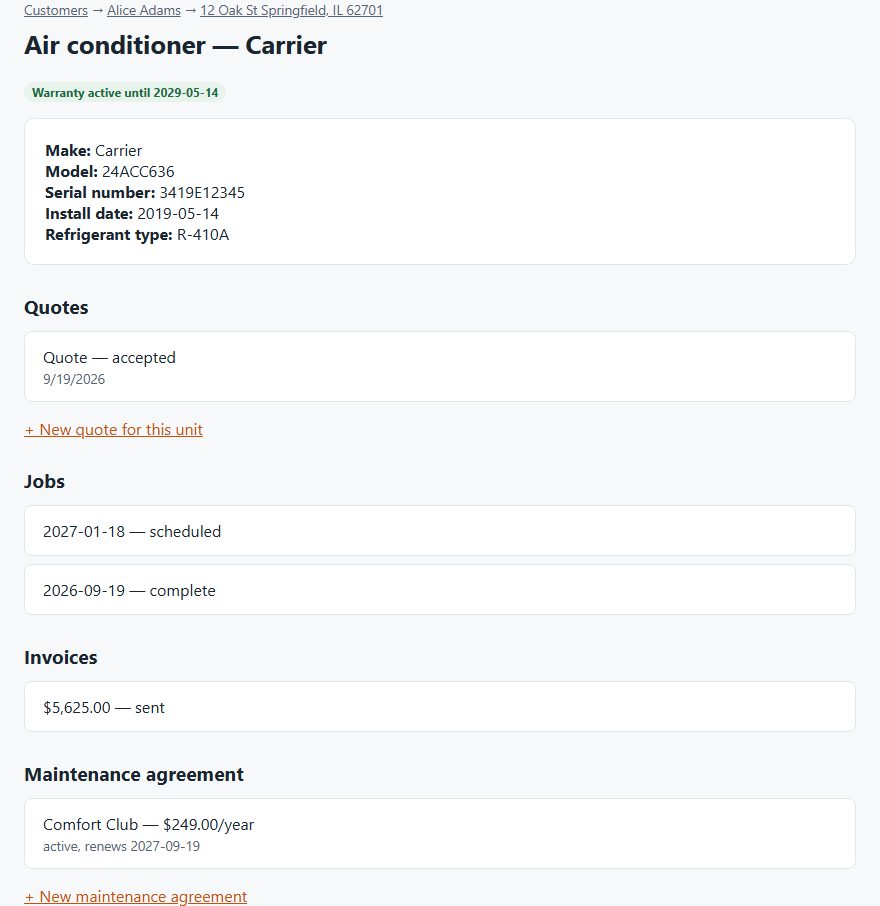
Most tools keep equipment as a note on a job. DuctWright keeps it as a record of its own, and everything else hangs off that record. We call it the Unit Ledger.

  • Type, make, model and serial number
  • Install date and refrigerant type
  • Warranty end date, with a badge that shows if it's still active
  • Photos of the nameplate and the unit's condition
  • Every quote, job and invoice for that unit
  • The maintenance plan that covers it
A unit record showing make, model, serial, install date, refrigerant, warranty and its quotes, jobs, invoices and maintenance agreement
A unit record with its history. Demo data.

Customers, properties and units

A customer can have more than one property. A property can have more than one unit. That fits landlords, second homes and small commercial sites.

Bring your customers with you

Upload a spreadsheet saved as a CSV file. Names, phone numbers, emails and service addresses come in together. Customers you already have are skipped, so you can import twice without doubles.

What it doesn't do

  • It stores photos, up to 25 per unit. It doesn't store documents such as PDFs or manuals yet.
  • Photos taken with no signal can't be queued yet. Add them when you're back online.
  • Equipment doesn't import from a spreadsheet yet. Customers and addresses do.
  • Imported addresses aren't placed on a map for route ordering yet.

Questions

What is the Unit Ledger?

It's our name for the permanent record each piece of equipment gets. Its make, model, serial, install date, refrigerant, warranty and full history all live on it.

Can I import my customer list?

Yes. Upload a CSV file with names, phone numbers, emails and addresses. Duplicates are skipped.

Can one customer have several properties?

Yes. Each property can hold several units.

Can I attach photos to a unit?

Yes. Add a JPEG, PNG or WebP photo of the nameplate or the unit's condition, up to 25 per unit. You can link a photo to a visit. Documents such as PDFs aren't supported yet.

What is the best HVAC CRM software?

It depends on what you need to track. A general CRM stores contacts and deals. An HVAC tool also needs equipment, warranty dates and maintenance plans tied to each customer. We make DuctWright, so we're biased. For a fair look, see how it compares with Housecall Pro and Jobber.

What is a CRM for contractors?

A CRM keeps your customers, their properties and your history with them in one place. For an HVAC shop, that should include each unit at each property, its warranty and its service history, so you don't rely on memory or paper.

Try it on your own customers

Add a customer and their equipment. See the unit's whole history in one place.

Start your free trial

14 days free. No card.